Seasonal Changes and Block Variations
Need enable
EnableSeasonDefinition.
Basic Description
This configuration is used to define block replacement, loot drops, or block generation rules that occur with seasonal changes in specific biomes (if omitted, biome checks are ignored). Pack authors can write similar configuration files to add seasonal change effects to different blocks.
This datapack requires blocks that support random ticks in order to minimize atomic operations. If such blocks are not available, you can refer to the Datapack Base section of the datapack to force-enable random ticks for blocks.
It is a JSON file placed in the resource pack root directory at data/<namespace>/eclipticseasons/season_definitions.
File Contents
Example Definition
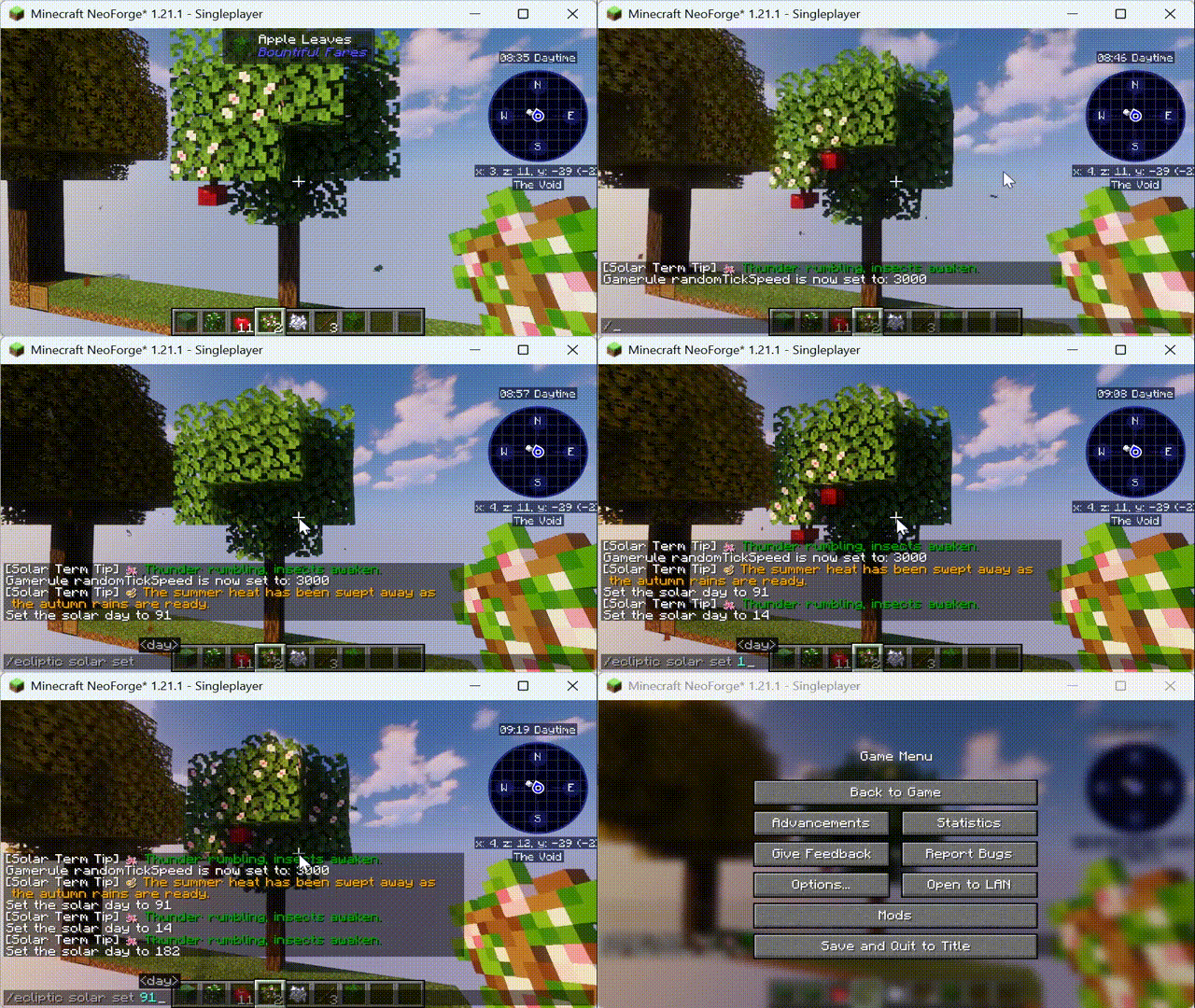
This example adds simple seasonal changes (spring and autumn) to the apple tree from the Bountiful Fares mod.
- Spring: Natural apple leaves (not player-placed) have a 16% chance to turn into flowering leaves. A fixed seed is used to avoid excessive randomness. Additionally, a hanging apple is generated below flowering leaves (not duplicated).
- Autumn: Flowering leaves revert back to normal apple leaves. Hanging apples are replaced with their corresponding loot (simulating fruit ripening).
⚠️ Note: The changes field is structured as a SolarTermValueMap, which also allows more fine-grained adjustments based on solar terms.
Custom conditions and placement methods are also supported. See the codebase for more details on extensibility.
{
  "biomes": "minecraft:plains",
  "changes": {
    "seasons": {
      "spring": [
        {
          "target": {
            "blocks": "bountifulfares:apple_leaves",
            "state": {
              "persistent": "false"
            }
          },
          "fixed_seed": true,
          "chance": 0.16,
          "place": {
            "block": {
              "Name": "bountifulfares:flowering_apple_leaves"
            },
            "copy_state": true
          }
        }
      ],
      "summer": [
        {
          "target": {
            "blocks": "bountifulfares:flowering_apple_leaves",
            "state": {
              "persistent": "false"
            }
          },
          "fixed_seed": true,
          "chance": 0.6,
          "place": {
            "block": {
              "Name": "bountifulfares:hanging_apple"
            },
            "conditions": [
              {
                "type": "empty_above",
                "above": false
              }
            ],
            "replace": false,
            "offset": [
              0,
              -1,
              0
            ]
          }
        }
      ],
      "autumn": [
        {
          "target": {
            "blocks": "bountifulfares:flowering_apple_leaves",
            "state": {
              "persistent": "false"
            }
          },
          "fixed_seed": true,
          "chance": 0.4,
          "place": {
            "block": {
              "Name": "bountifulfares:hanging_apple"
            },
            "conditions": [
              {
                "type": "empty_above",
                "above": false
              }
            ],
            "replace": false,
            "offset": [
              0,
              -1,
              0
            ]
          }
        },
        {
          "target": {
            "blocks": "bountifulfares:flowering_apple_leaves",
            "state": {
              "persistent": "false"
            }
          },
          "chance": 0.1,
          "place": {
            "block": {
              "Name": "bountifulfares:apple_leaves"
            },
            "copy_state": true
          }
        },
        {
          "target": {
            "blocks": "bountifulfares:hanging_apple"
          },
          "chance": 0.01,
          "place": {
            "loot": "bountifulfares:blocks/hanging_apple"
          }
        }
      ],
      "winter": [
        {
          "target": {
            "blocks": "bountifulfares:flowering_apple_leaves",
            "state": {
              "persistent": "false"
            }
          },
          "chance": 0.5,
          "place": {
            "block": {
              "Name": "bountifulfares:apple_leaves"
            },
            "copy_state": true
          }
        },
        {
          "target": {
            "blocks": "bountifulfares:hanging_apple"
          },
          "chance": 0.1,
          "place": {
            "loot": "bountifulfares:blocks/hanging_apple"
          }
        }
      ]
    }
  }
}
Creating Seasonal Tree Behavior with Ecliptic Seasons
Example: Apple Tree Integration from Bountiful Fares
This guide explains how to use the Ecliptic Seasons datapack system to create seasonal plant behavior. We will use the apple tree definition from Bountiful Fares as a practical example.
The goal of this file is to demonstrate how a tree can progress through a complete seasonal lifecycle:
- Spring: trees bloom
- Summer: flowers produce fruit
- Autumn: fruit continues and leaves begin returning to normal
- Winter: the tree clears remaining fruit and flowers
The entire system is driven by season definition JSON files.
1. File Location
Season definitions are placed inside a datapack or resourcepack under:
data/<your_namespace>/eclipticseasons/season_definitions/
Example:
data/es_dp_x_bountifulfares_extra/eclipticseasons/season_definitions/apple.json
Each JSON file typically describes one plant type or behavior group.
2. Basic File Structure
A typical season definition looks like this:
{
  "biomes": "minecraft:plains",
  "changes": {
    "seasons": {
      "spring": [ ... ],
      "summer": [ ... ],
      "autumn": [ ... ],
      "winter": [ ... ]
    }
  }
}
Fields
| Field | Purpose |
|---|---|
biomes |
Which biome(s) this rule applies to |
changes |
Defines what seasonal changes occur |
seasons |
Contains rules for each season |
The system will evaluate the rules only when the world is currently in that season.
3. Core Rule Structure
Each entry inside a season block describes one transformation rule.
Example:
{
  "target": {
    "blocks": "bountifulfares:apple_leaves",
    "state": {
      "persistent": "false"
    }
  },
  "fixed_seed": true,
  "chance": 0.16,
  "place": {
    "block": {
      "Name": "bountifulfares:flowering_apple_leaves"
    },
    "copy_state": true
  }
}
Rule Components
| Field | Meaning |
|---|---|
target |
Which block(s) this rule searches for |
state |
Optional block state filtering |
chance |
Probability of triggering |
place |
What happens when the rule triggers |
fixed_seed |
Keeps randomness stable |
4. Target Selection
The target section defines which blocks can be affected.
Example:
"target": {
  "blocks": "bountifulfares:apple_leaves",
  "state": {
    "persistent": "false"
  }
}
Explanation:
blocksdefines the block IDstatefilters block states
In this case the rule applies only to natural apple leaves (not leaves placed by players).
This avoids modifying decorative builds.
5. Random Chance
The chance field determines the probability of the rule applying.
Example:
chance: 0.16
This means 16% probability.
Typical values:
| Value | Meaning |
|---|---|
| 0.01 | very rare |
| 0.1 | occasional |
| 0.3 | common |
| 0.6+ | very frequent |
Season systems typically use small probabilities to create natural variation.
6. Stable Randomness (fixed_seed)
fixed_seed: true
This makes the result stable for the same block position.
Without this option:
- flowers may randomly appear/disappear
- fruit locations change constantly
With fixed_seed:
- the same branches bloom each year
- trees look more natural and stable
Recommended usage:
| Behavior | Use fixed_seed |
|---|---|
| flowering | yes |
| fruit generation | yes |
| falling fruit | usually no |
7. Block Replacement
Example:
"place": {
  "block": {
    "Name": "bountifulfares:flowering_apple_leaves"
  },
  "copy_state": true
}
This replaces the target block.
copy_state: true preserves properties like:
- leaf decay distance
- persistent flag
- waterlogged state
Without this option the tree may break.
8. Placing Blocks Nearby
Fruit often appears under leaves, not replacing them.
Example:
"place": {
  "block": {
    "Name": "bountifulfares:hanging_apple"
  },
  "offset": [0, -1, 0],
  "replace": false
}
Explanation:
| Field | Meaning |
|---|---|
offset |
where the new block appears |
[0,-1,0] |
directly below the leaf |
replace:false |
do not overwrite existing blocks |
This creates hanging fruit under the canopy.
9. Conditions
Example:
"conditions": [
  {
    "type": "empty_above",
    "above": false
  }
]
Conditions prevent invalid placements.
Typical uses:
- avoid spawning fruit inside blocks
- ensure open air
- restrict placement surfaces
10. Loot Actions
Instead of placing a block, the system can trigger loot tables.
Example:
{
  "target": {
    "blocks": "bountifulfares:hanging_apple"
  },
  "chance": 0.01,
  "place": {
    "loot": "bountifulfares:blocks/hanging_apple"
  }
}
This simulates fruit falling from the tree.
The loot table controls:
- drops
- items
- particle effects
- sounds
11. Seasonal Lifecycle Example
Using the apple tree definition, the lifecycle becomes:
Spring
- normal leaves → flowering leaves
apple_leaves → flowering_apple_leaves
Summer
- flowers produce fruit
flowering_apple_leaves → hanging_apple
Autumn
Three processes occur simultaneously:
- fruit still grows
- some flowers revert to leaves
- some apples fall
This creates a natural harvest phase.
Winter
Cleanup phase:
- flowers revert to normal leaves
- fruit falls more frequently
The tree returns to its base state.
12. Design Philosophy
Season definitions are built around three core ideas:
- Target blocks
- Probability
- Result actions
By combining these elements, the system can simulate:
- flowering cycles
- fruit production
- leaf changes
- plant growth
- natural decay
This allows mod vegetation to integrate smoothly into the Ecliptic Seasons climate system.
13. When to Use Seasonal vs Default Rules
There are two main rule types:
Seasonal Rules
changes → seasons
Used for plants with strong seasonal behavior.
Examples:
- apple
- cherry
- plum
- maple
Default Rules
changes → default
Used for plants with weak seasonal patterns.
Examples:
- lemon
- orange
- coconut
- evergreen trees
These plants operate continuously rather than by season.
14. Tips for Creating Your Own Definitions
Good practices:
• start with small probabilities • preserve block states when replacing • use offsets for fruit placement • use stable randomness for visual elements
Avoid:
• large probabilities on frequently scanned blocks • replacing blocks without copying state • placing fruit without space checks
15. Summary
Season definitions allow datapacks to simulate natural ecological cycles.
Using a few simple rules, mod vegetation can:
- bloom in spring
- bear fruit in summer
- shed fruit in autumn
- reset in winter
This system enables mods like Bountiful Fares to fully participate in the Ecliptic Seasons seasonal ecosystem.
End of Guide